October 2026
New
- Canvases
- A board beside your documents: sticky notes, checklists, text, shapes, frames, arrows, pictures, links, PDFs, formulas, graphs, and a pen.
- Make document turns the board into a document, frames as headings and notes as paragraphs. Write it up has the assistant write it from your notes.
- Open any document as a canvas to rearrange it, or send a sentence from a document to a board. Several people can work on one at once.
- Handwritten formulas
- Write a formula with a mouse, a trackpad or a pen, in a document or on a canvas, and it is read back as one.
- End a formula with = and the answer is offered: a number, a derivative, an integral, the roots of an equation.
- Function graphs
- Draw one or more functions of x, in a document or on a canvas, and change them later.
- Chemistry in formulas
- Write H2O, SO4^2- and reaction arrows the way chemists do, with \ce{}.
- Projects and folders
- Documents live in projects, with folders inside. A project has its own style and variables for every document in it.
- Link one document to another and it lists what links to it, so a project works as a small wiki.
- Working together
- Ask people into a project by email, as editors or as readers.
- One person edits a document at a time while everyone else watches it change, live.
- Comments and suggested edits
- Comment on any words and reply to each other. Anyone who can read a document can suggest an edit, and its editors accept or reject it side by side.
- Share links you can set
- Several links to the same thing, each with its own name: which folders and documents it reaches, the page it opens on, copy and download, what agents may do, live or frozen, and until when.
- A project shared as a link is a small website of its pages.
- Pictures made here
- Gradients, smoke, glow, grain, dither and paper in the document’s own colours, a cover page from a title, and effects over your own photos.
- Agents can do more
- Over MCP, an agent can now file documents in projects, read and answer comments, suggest edits, go back to an earlier version, draw graphs and work on canvases.
- The assistant in the editor can look at the page it is changing, and read your other documents and canvases.
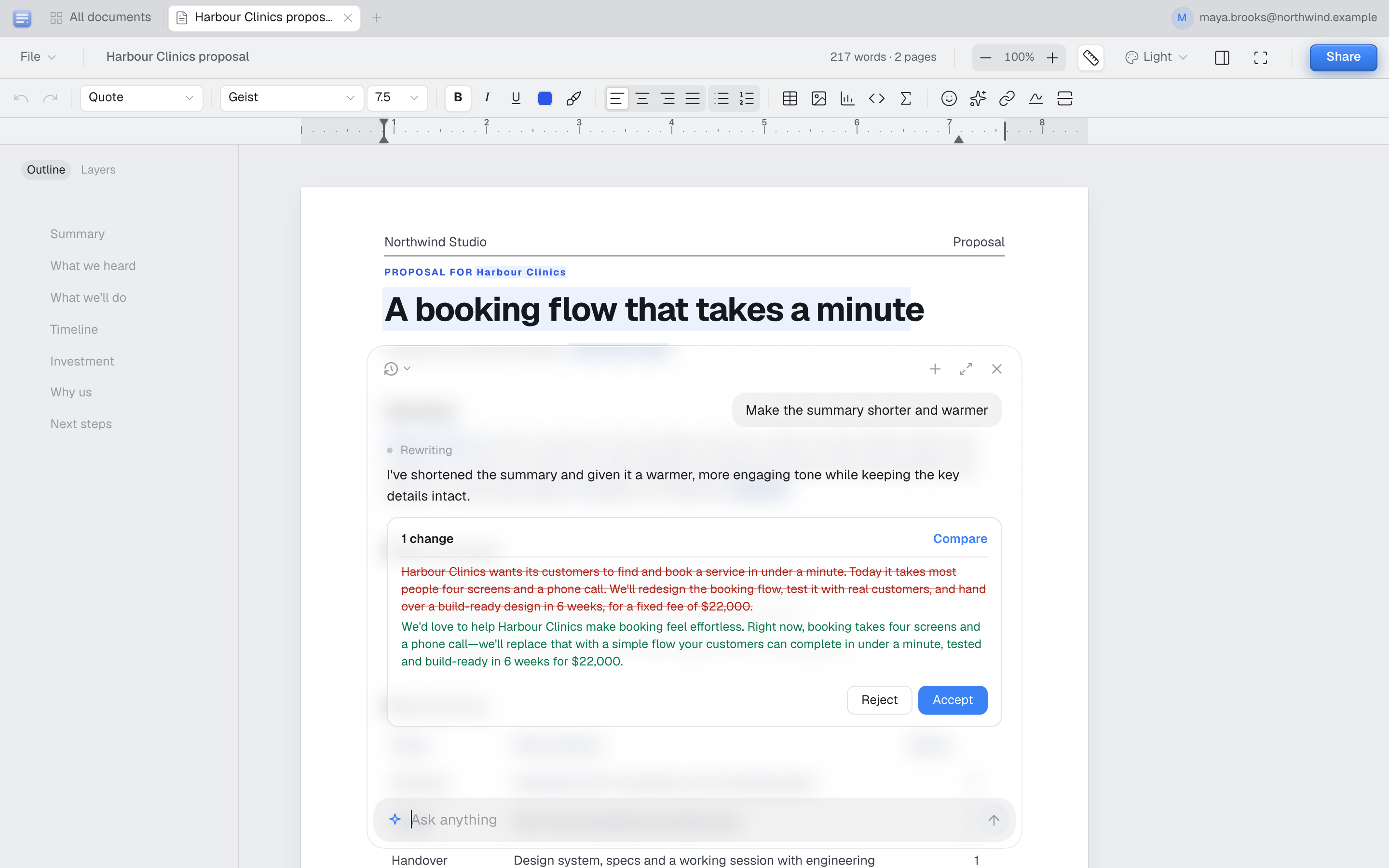
- An assistant in the editor
- Ask it to rewrite a section, fix the tone or answer a question about the document. Nothing to connect.
- It comes back with a suggestion. Compare shows it in the document, struck through and in green, and Accept is one step you can undo.
- Starts as a small bar at the foot of the page, opens into a card, and pulls out into a side panel.
- Document styles
- Nine looks for the whole document, from a contract to a book on old paper, each previewed on your own first page.
- A reader
- Full screen is now for reading: scroll, one page or two, with pages that turn.
- Read in any style without changing the document, make the text bigger, jump by page or heading, and pick up where you left off.
- Notes open where they are, and it can read aloud.
- Table styles
- A gallery of looks for a table, with white text on dark fills.
- Format painter
- Copy the look of one paragraph onto another.
- Picture alignment
- Line a picture up left, centre or right in one click.
- Zoom by pinch, and with ⌘+ and ⌘−
Improved
- Shortcuts work on any keyboard layout
- Ctrl+Y redoes, ⌘K adds a link and ⌘/ opens the command palette.
- Tab moves between table cells
- Things move
- Menus, panels, dialogs and the assistant ease in and out instead of appearing.
- The tab you are in is always in view
- You stay signed in
- For sixty days, in every browser, Safari included.
- The editor opens faster
- Signed in, anagramdocs.com takes you straight to your documents
- An agent’s edits appear as it makes them
- No reload, and you stay on the page you were reading.
- Save, in one place
- PDF, Markdown, Word and an .anagram file under one Save in the File menu.
- Right-click on the dashboard
- New documents, canvases and folders where you click, and a menu for every document and folder.
- A slimmer rail of tabs
- Down the left in the editor it folds to icons and opens under the pointer. Ctrl+1 to 9 go to your open tabs.
- Dark mode on the sign-in page
Fixed
- A chart never runs through its own table
- Header rows are never left alone at the foot of a page
- Pie charts are round
- Word files no longer put numbers next to floating pictures
- Clear formatting clears everything
- New tables no longer start in bold
- Text no longer runs into a picture caption
- Pictures drag from one page to another
- A cover’s title no longer sits at the very top of the page
September 2026
New
- Sign in with a code
- Type your address and we email you six digits. No password, no link to open on the right device.
- Sign in with Google
- One share link for people and for agents
- Anyone with the link can read the document. An assistant given the link can read it and edit it.
- Edit links
- Paste a share link into ChatGPT or Claude and ask for a change. It writes a link; click it and the change is applied as one version you can undo.
- Fonts, styles, tables, charts and page backgrounds, not only the words.
- Paper grain page backgrounds
- A fine printed grain on the page, which carries through to the PDF.
- Features, AI, pricing and comparison pages
Improved
- Charts stay where you put them
- A chart you move by hand keeps its place. Charts nobody has moved still follow the table they read from.
- Clearer edges around the window
- Heavier lines under the toolbars and beside the side panels, and a darker tab bar.
- Signing out really signs you out
- The session ends on our side as well as in your browser, so a copy of it stops working too.
Fixed
- The cursor after a formula
- It sat a whole formula’s width away from the equation, and stood taller than it.
- Word export of tables
- Tables opened in Word at their own column widths instead of being resized by Word.
- Shared documents read by assistants
- An assistant opening a share link saw the title and none of the text.
- Agents editing past the end of a document
- A paragraph number that did not exist quietly replaced the last paragraph. It is now refused with the numbers that do.